

Industrial and Commercial Antennas 4G/5G for Business Continuity
Even a short connection outage means lost sales, production and security for a business. Industrial and commercial antennas cover Poynting's outdoor antenna solutions for stores, branches, factories, warehouses and construction sites that use a 4G/5G router as their primary or backup link.
- 617–7200 MHz
- 2×2 ve 4×4 MIMO
- Primary and backup link
- CPE with router enclosure
- Wi-Fi and GNSS
Why does a business 4G/5G connection need an external antenna?
4G/5G primary link
- It is the only connection at branches, construction sites and facilities that fibre does not reach.
- All business traffic goes through this link; speed and latency directly determine productivity.
- The router usually sits indoors, in a cabinet or server room.
4G/5G backup link
- When fibre fails, POS, tills, cameras and cloud applications switch to the backup link.
- The backup link can sit unused for months; you must know it works when it is needed.
- With dual SIM, the router can switch automatically between two operators.
Where are industrial and commercial antennas used?
Branches, stores, POS
A backup 4G/5G link for tills, payment terminals and stock systems; a compact X-pol antenna on the roof or facade.
Dual-SIM automatic failoverTemporary offices and sites
A quick-to-install, portable system: an ePoynt housing the router, or a directional antenna on a mast.
AMIT 5G routerFactories and warehouses
Cellular connectivity for production data, MES and warehouse terminals, plus outdoor Wi-Fi antennas covering the site.
IoT and M2M antennasCameras and alarms
Camera video needs high upload speed; a 4×4 antenna and good SINR are decisive.
4G camera monitoringRouters and SD-WAN
On Celerway routers that bond multiple 5G modems and operators into one connection, a MIMO antenna for every antenna port of each modem.
Celerway Stratus 5GMobile phone coverage
If staff and customers have no phone signal indoors, the problem is coverage, not the router; an operator-approved repeater solution is required.
Stella Doradus repeaterWhich antenna for which situation?
In the city, base station direction unclear. XPOL-1-5G+ (2×2 / 4×4) or OMNI-0600.
Rural facility, distant base station. XPOL-2-5G-V3 (2×2) or XPOL-24 (4×4), 11 dBi.
Very remote site, 5G and Wi-Fi 6E bands. 617–7200 MHz with two LPDA-500 antennas.
Router outdoors, next to the antenna. ePoynt enclosure; only Ethernet (PoE) runs into the building.
Cabinets, kiosks, vehicles. PUCK family: low profile, IP69K.
Yard, warehouse and second building. OMNI-0700 outdoor Wi-Fi antennas.
Before choosing, measure the site's RSRP, RSRQ and SINR values. Step-by-step antenna selection for fixed sites: FWA antenna selection.
Poynting commercial antennas for industry and business
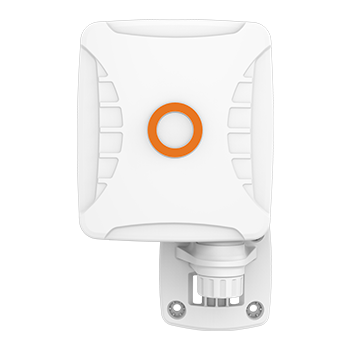
XPOL-1-5G+
Cross-polarized omnidirectional 5G antenna.
- 410–6000 MHz
- 6 dBi (2×2) · 7 dBi (4×4)
- Pole, wall, window
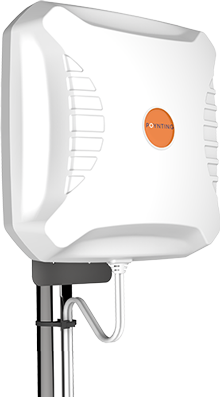
XPOL-2-5G-V3
Directional X-pol antenna for remote facilities.
- 617–4200 MHz
- 11 dBi · 2×2 MIMO
- Pole, wall, window
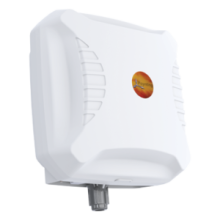
ePoynt
Antenna and router in the same outdoor enclosure.
- 617–4200 MHz
- Directional or omnidirectional
- 185 × 145 × 45 mm router
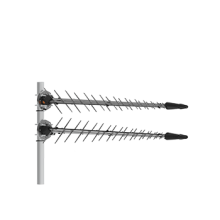
LPDA-500
Directional antenna covering 617–7200 MHz continuously.
- 617–7200 MHz
- 11 dBi · SISO
- 2×2 with two units
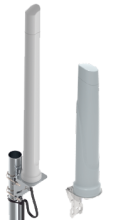
OMNI-0600 and OMNI-0700
Omnidirectional cellular and Wi-Fi antennas.
- OMNI-0600: 410–3800 MHz, 2×2
- OMNI-0700: 2.4 / 5 GHz Wi-Fi
- Wall and pole mount
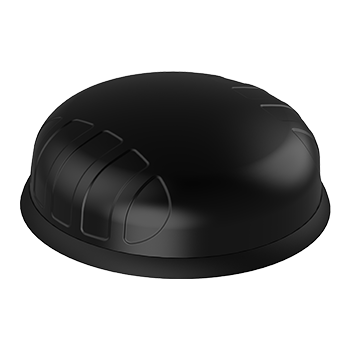
PUCK family
Compact, for cabinets and kiosks.
- 617–6000 MHz
- Wi-Fi and GNSS options
- IP69K · 9 models
Directional antennas Remote facilities
| Model | Frequency | Peak gain | MIMO | Page |
|---|---|---|---|---|
| XPOL-2-5G-V3 | 617–4200 MHz | 11 dBi | 2×2 | XPOL family |
| XPOL-24 | 617–4200 MHz | 11 dBi | 4×4 | Product page |
| LPDA-92 | 698–3800 MHz | 11 dBi | SISO | Product page |
| LPDA-500 | 617–7200 MHz | 11 dBi | SISO | Product page |
Omnidirectional antennas and ePoynt
| Model | Frequency | Peak gain | Pattern | MIMO | Page / datasheet |
|---|---|---|---|---|---|
| XPOL-1-5G+ | 410–6000 MHz | 6 / 7 dBi | Omni | 2×2 / 4×4 | Product page |
| OMNI-0600 | 410–3800 MHz | 6.2 dBi | Omni | 2×2 | Product page |
| EPNT-1 | 617–3800 MHz | 5 dBi | Omni | 2×2 / 4×4 | |
| EPNT-2 | 617–4200 MHz | 11 dBi | Directional | 2×2 | |
| EPNT-4 | 617–4200 MHz | 3 dBi | Omni | 4×4 |
For the OMNI-0700 Wi-Fi models and all PUCK family models, see the IoT and M2M antennas page.
Correct installation at business sites
Roof or facade
Move the antenna outside the building to a high, unobstructed point; building penetration loss disappears.
Direction and measurement
Aim the directional antenna in the direction that gives the best SINR. Details: RSRP, RSRQ and SINR measurement.
Cable or ePoynt
Instead of a long coaxial run, move the router closer to the antenna, or take it outdoors with ePoynt and bring Ethernet inside. Details: LMR cable insertion loss.
All MIMO ports
Connect all of the router's cellular ports; on a 4×4 router, a 4×4 antenna gives a clear speed gain.
Lightning protection
On rooftop installations, grounding and a lightning arrestor on every cable. Details: antenna lightning protection.
Test the backup link
The backup link is only used during outages; test failover and signal quality at regular intervals.
About industrial and commercial antennas
Is an external antenna needed for a 4G/5G backup link?
Yes, if the router is in a server room or cabinet. A backup link is only useful if it gets a good signal when needed; an external antenna ensures this.
Should I choose a directional or omnidirectional antenna?
If the base station is distant and its direction is known, a directional antenna gives higher gain. In the city, where several base stations are in range, an omnidirectional X-pol antenna is more stable.
When is ePoynt the right choice?
When the distance between antenna and router is long. ePoynt places the router behind the antenna in an outdoor enclosure; only an Ethernet (PoE) cable enters the building and coaxial loss is eliminated.
Phones have no signal indoors. Will an antenna solve it?
An antenna connected to a router only improves the router's connection. In-building coverage for phones requires an operator-approved repeater (signal booster) solution.
Which antenna does my router support?
Check the number of antenna ports (2 or 4) and the connector type (SMA, TS-9, N). Choose a MIMO antenna matching the port count; use a suitable adapter if needed.
Read more
For product information, you can also visit the official Poynting website.