

IoT and M2M Antennas Reliable 4G/5G for Connected Devices
Smart meters, EV chargers, kiosks, lifts, SCADA cabinets or warehouse terminals: IoT and M2M devices often operate inside metal cabinets, in basements or on factory floors. IoT and M2M antennas cover the Poynting solutions that let these devices receive the signal from outside, reliably and consistently.
- 617–7200 MHz
- Cat 1 · Cat M · RedCap · 5G
- Cellular + Wi-Fi + GNSS
- IP69K compact
Why does connectivity weaken on IoT devices?
Device location
- Metal cabinet: The enclosure acts like a Faraday cage; the internal antenna inside loses most of the signal.
- Basements and indoors: Meter rooms, car parks and lift shafts are the points with the weakest coverage.
- Factory floor: Metal structures and machinery cause reflections and interference.
Device design
- Little data, always connected: Most IoT devices send small data packets, but the connection must never drop.
- One or two antenna ports: LTE Cat 1, Cat M and 5G RedCap modems are usually SISO or 2×2.
- Long service life: The device runs in the field for years without maintenance.
Where are IoT and M2M antennas used?
Meters and EV charging
A compact antenna outside the cabinet for smart meters, solar plants and EV charging stations.
EV charging station connectivitySCADA and telemetry
Pump stations, substations and remote site cabinets; an LTE modem and external antenna for RS-232/RS-485 devices.
4G SCADA solutionRS-232 devices
Connecting legacy serial devices to the network over LTE Cat 1; little data, long life.
RS-232 LTE Cat 1 modemKiosks, signage, vending
A vandal-resistant, low-profile antenna for payment terminals and digital signage. Not every external antenna suits every application.
IoT antenna selection and installationWarehouses and terminals
Wide-area Wi-Fi for handheld terminals, forklifts and barcode scanners; PUCK-12 and PUCK-14 with multiple Wi-Fi ports.
Poynting PUCK-14Environmental monitoring
Server rooms, cold rooms and water levels; an external antenna for the LTE backup of sensor devices.
HW-Group monitoring solutionsWhich antenna for which device?
Single-port Cat 1 / Cat M / RedCap modem. PUCK-1: compact, IP69K, 617–6000 MHz.
Dual-port industrial router. PUCK-2; PUCK-5 if Wi-Fi and positioning are also needed.
Asset tracking, time sync. PUCK-3, PUCK-4 or PUCK-5, combining cellular and GNSS in one housing.
Wall or pole, wideband. OMNI-0297 Rhyno: 698–3800 MHz omnidirectional cellular antenna.
Warehouse and site Wi-Fi. OMNI-0700 family; PUCK-12 / PUCK-14 for multiple Wi-Fi ports.
Rural, very weak signal. Directional XPOL or LPDA antenna; details on the FWA antenna selection page.
For 5G RedCap devices: 5G RedCap. For the role of LTE Cat 1 in IoT: LTE Cat 1 modem advantages. For weak-signal sites: FWA antenna selection.
Poynting M2M antennas for IoT
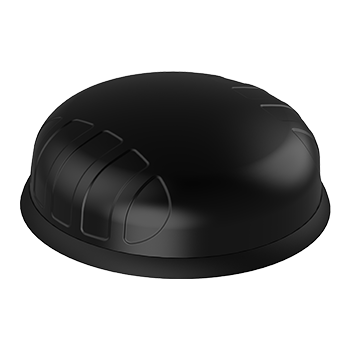
PUCK family
Compact, IP69K, impact resistant.
- 617–6000 MHz cellular
- Wi-Fi and GNSS options
- 9 models
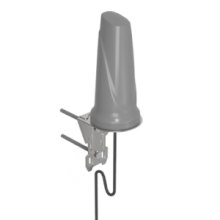
OMNI-0297 Rhyno
Wideband omnidirectional cellular antenna.
- 698–3800 MHz
- Balanced gain across the band
- Suited to carrier aggregation
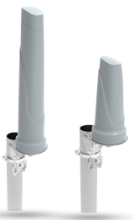
OMNI-0700 family
Low-profile outdoor Wi-Fi antennas.
- 2.4 GHz · 5 GHz · dual band
- 4 – 8 dBi
- 6 models
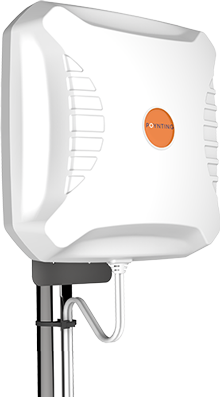
XPOL-2-5G-V3
Directional X-pol antenna for weak-signal sites.
- 617–4200 MHz
- 11 dBi · 2×2 MIMO
- Pole, wall, window
PUCK family 9 models
| Model | Cellular | Wi-Fi | GNSS | Peak gain | Page |
|---|---|---|---|---|---|
| PUCK-1 | SISO | – | – | 5.5 dBi | View |
| PUCK-2 | 2×2 | – | – | 6.5 dBi | View |
| PUCK-3 | SISO | ✓ | ✓ | 5.5 dBi | View |
| PUCK-4 | 2×2 | – | ✓ | 6.5 dBi | View |
| PUCK-5 | 2×2 | ✓ | ✓ | 6.5 dBi | View |
| PUCK-7 | 2×2 | ✓ | – | 6.5 dBi | View |
| PUCK-8 | 2×2 | ✓ | – | 6.5 dBi | View |
| PUCK-12 | – | 2×2 | – | 7.5 dBi (Wi-Fi) | View |
| PUCK-14 | – | 4×4 | – | 9 dBi (Wi-Fi) | View |
To compare the models side by side: PUCK family product comparison.
OMNI-0700 family Wi-Fi
Correct installation of IoT antennas
Outside the cabinet
Mount the antenna on top of or on the outer surface of the metal cabinet; single-hole-mount compact antennas are designed for exactly this.
Metal surface advantage
The cabinet's metal roof acts as a ground plane and improves the radiation of antennas such as the PUCK.
Short cable
IoT modems run at low power; long cable losses quickly eat into the link margin. Details: LMR cable insertion loss.
Connector compatibility
Check the modem's connector type (SMA, RP-SMA, U.FL); choose antennas with the right cable rather than adapters.
Vandalism and impact
Whip antennas break in public spaces; low-profile IP69K antennas withstand impact and tampering.
Verify by measuring
After installation, check the RSRP, RSRQ and SINR values on the modem.
Detailed guide with field examples: antenna selection and installation in IoT and M2M applications.
About IoT and M2M antennas
Does an IoT device need an external antenna?
Yes, if the device is inside a metal cabinet, in a basement or at a point with weak coverage. The internal antenna tries to receive the signal through the cabinet; an external antenna receives it outside, without that loss.
Which antenna for an LTE Cat 1 or Cat M modem?
These modems usually have one or two antenna ports. PUCK-1 suits a single port and PUCK-2 suits two ports. Good coverage of low bands such as 700/800/900 MHz is important.
Which antenna do 5G RedCap devices use?
RedCap modems mostly have one or two receive paths; a SISO or 2×2 antenna covering 617–6000 MHz is sufficient.
How long should the cable between antenna and modem be?
As short as possible. The integrated cable of compact antennas is usually enough; if an extension is needed, use low-loss cable.
Can Wi-Fi and cellular be in a single antenna?
Yes. PUCK-3, PUCK-5, PUCK-7 and PUCK-8 combine cellular and Wi-Fi; PUCK-3/4/5 also add GNSS in the same housing.
Read more
For product information, you can also visit the official Poynting website.